Salon Appointment Booking Software for Hair, Nails, Massage and Beauty Services
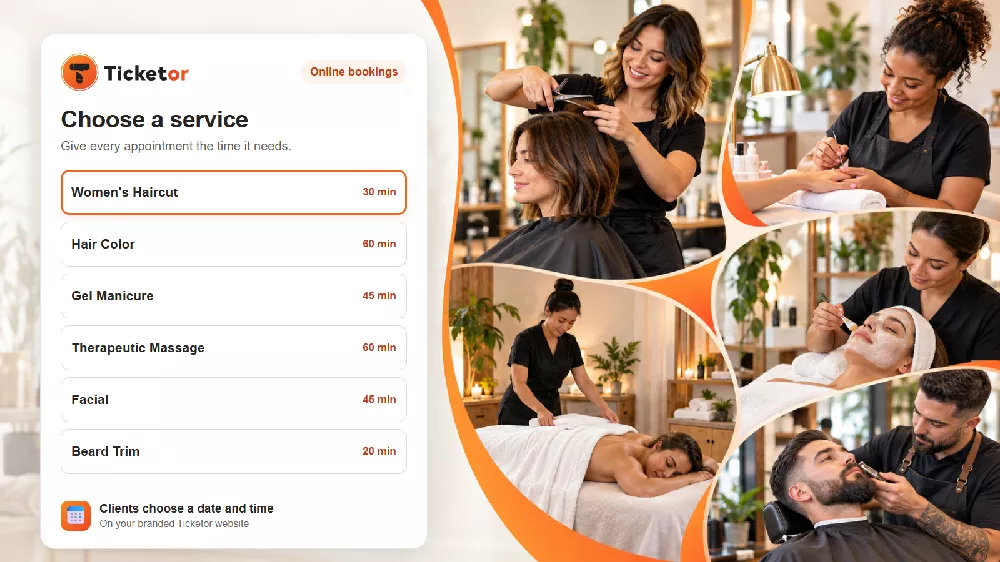
A salon day is not made of identical appointments. A beard trim may need 20 minutes. A haircut may need 30. A manicure or facial may take 45, while color services and massages can occupy an hour or more.
When every service is forced into the same time slot, the schedule becomes either too tight or full of unusable gaps. Staff spend the day recovering from the calendar instead of serving clients.
Ticketor Bookings gives salons, spas, wellness businesses, and other appointment-based teams a clearer approach: clients choose the service they want, then select an available date and time based on the duration and rules for that service.
One booking page, different services and durations
You can present several services on one branded booking page while giving each one its own duration, price, capacity, availability, and booking rules.
For example, a business might offer:
Example appointment durations by service
| Service | Example duration |
|---|
| Beard trim | 20 minutes |
| Haircut | 30 minutes |
| Gel manicure | 45 minutes |
| Facial | 45 minutes |
| Hair color | 60 minutes |
| Therapeutic massage | 60 minutes |
These are examples, not presets. You decide how long each service lasts and how often clients can start it. A 60-minute treatment can begin every 30 minutes if overlapping appointments make sense for your team, or only once per hour if one professional and one room must remain dedicated to it.
You can also add buffer time before or after a service. That gives staff time to clean a station, prepare a treatment room, sanitize tools, take notes, or simply avoid a calendar that leaves no breathing room.
Useful for more than hair salons
The same booking structure works anywhere customers choose a service and reserve time. That includes:
- Hair salons, independent stylists, and mobile stylists
- Barbershops and grooming studios
- Nail salons and independent nail technicians
- Massage therapists, day spas, and wellness studios
- Estheticians, facial, lash, and brow studios
- Makeup artists and beauty consultants
- Tattoo and piercing studios
- Tanning studios
- Personal trainers and private yoga instructors
- Pet groomers and other appointment-based local services
It can also work for consultations, fittings, lessons, private sessions, equipment rentals, tours, and activities. The name of the service changes; the basic customer experience remains familiar: choose what you need, choose when you want it, and complete the booking.
Protect the working day from scheduling conflicts
An online booking page should show real availability, not merely collect a preferred time that someone must confirm later.
With Ticketor, you define the days and hours that can be booked, how far ahead customers may book, when booking closes, capacity for each service group, and any dates or times that should be skipped. Connected calendars can be checked for conflicts so a blocked time is not offered again.
This helps a solo professional protect one calendar and lets a larger business model shared capacity—for example, the number of treatment rooms, manicure stations, rental items, or staff members available for a service.
Choose what secures the appointment
Not every service needs the same checkout rule. A quick trim may be easy to reserve without an upfront charge. A long color appointment, bridal makeup session, or premium treatment may justify a deposit or stronger commitment.
Depending on your configuration and payment processor, a booking can require:
- Full payment at checkout
- A partial payment with the balance due later
- A full or partial card authorization without capturing the authorized amount as a payment
- Email verification
- Phone verification
- No upfront payment or authorization
That flexibility lets the business match the booking requirement to the cost, duration, and no-show risk of the service. The buyer still sees the full price and, when applicable, what will be paid or held today.
Collect the details staff need before the client arrives
Reusable checkout questions can collect information for the buyer or for each attendee. A salon or wellness business might ask about the requested stylist, preferred color, current hair length, accessibility needs, allergies, treatment preferences, or anything else needed to prepare.
Use questions thoughtfully. Collect only what the business genuinely needs, explain why it is useful, and avoid requesting sensitive information when a safer in-person conversation will do.
After booking, the customer can receive a confirmation and calendar invitation with the appointment details, attendee count, relevant answers, and after-purchase notes. Those notes are a useful place for arrival instructions, preparation guidance, parking information, or the cancellation policy.
Give clients a clearer way to manage changes
When permitted by the policies you configure, clients can manage a booking from their account or confirmation path. They can reschedule the whole appointment to another available time, exchange to another eligible service, or cancel as allowed.
Rescheduling keeps the same service and attendees while moving the appointment to the newly selected time. Confirmation details and calendar information can then reflect the updated appointment, reducing manual back-and-forth for the business.
Run bookings and the rest of the business in one place
Bookings are more useful when they are not isolated from everything else. Ticketor can also provide your branded website and content-management tools, customer records and communication, marketing tools, reviews, gift cards, merchandise or retail items, donations, auctions, and event ticketing.
That means a salon could sell a gift card, take an appointment, promote a workshop, offer a retail product, and keep the customer relationship in the same platform. A spa could book treatments and sell admission to a wellness event. A studio could schedule private sessions while also selling classes or special events.
The goal is not to make every business operate the same way. It is to give each business one adaptable system for the different things it already sells.
Start accepting online appointments
Ticketor Bookings is designed for services with real durations, real capacity, and real scheduling constraints—not only for a generic “request an appointment” form.
Read the Ticketor appointment and rental booking guide to see how the feature is configured. If you would like to discuss your services and workflow, schedule a meeting with Ticketor. If you are ready to explore the platform, start with Ticketor.
