Ticketor Launches Online Bookings for Appointments, Rentals, Tours and Activities
September 22, 2026 — Many organizations do more than sell admission to events. A theater may rent rehearsal space. A museum may schedule guided tours. A community organization may offer classes and private lessons. A marina may rent boats or equipment. A venue may book rooms by the hour. Until now, those services often required a separate scheduling product alongside the organization's ticketing, website, customer database, marketing, store, and fundraising tools.
Ticketor has launched Bookings, giving event organizers and service businesses a single place to offer appointments, venue and equipment rentals, tours, activities, classes, lessons, consultations, and other scheduled services.
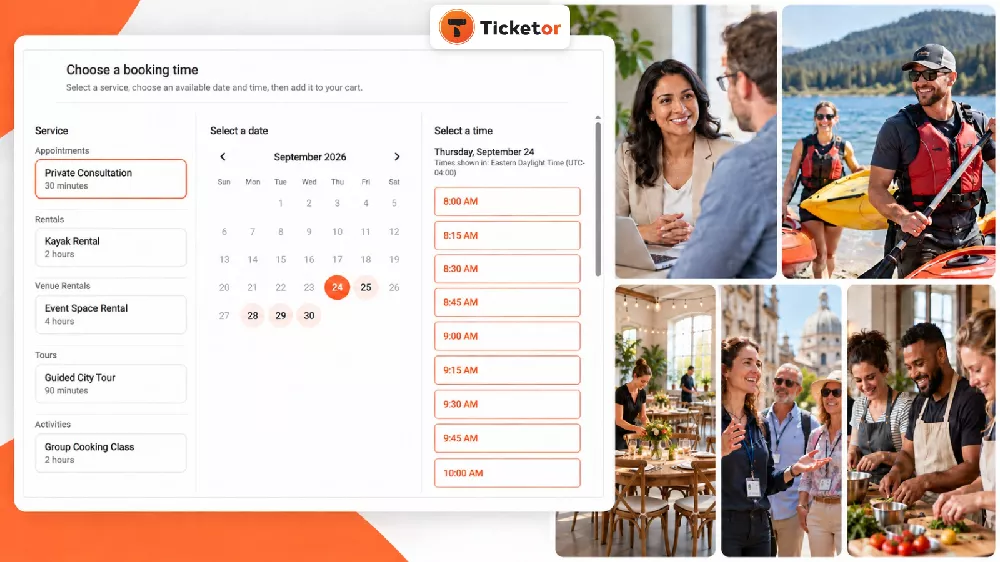
Customers can choose a service, select an available date and time, answer the questions required for that booking, and complete the reservation from the same branded Ticketor site they already use for events and purchases.
A booking experience built around the service
Bookings uses a simple three-step buyer flow: choose a service, choose a date, and choose an available time. Behind that straightforward experience, the organizer controls the details that make each service work.
For each booking, an organization can configure:
- recurring appointment or rental schedules and dates to skip;
- service duration, start-time intervals, capacity, and booking buffers;
- booking windows that control how early or late customers may reserve;
- service choices and prices, including pricing that changes by date;
- questions for the buyer or for each attendee;
- confirmation details, after-purchase instructions, and calendar invitations;
- cancellation, rescheduling, and exchange rules; and
- reports and calendar-style views for upcoming bookings.
Available times are calculated from the booking schedule, booking window, existing reservations, skipped dates, and connected calendars used to check availability. This helps prevent a room, staff member, boat, or piece of equipment from being offered when it is already busy.
Organizers can review the complete setup workflow in the Ticketor Bookings instructions, or see the buyer experience in a live booking example.
Flexible confirmation: payment, authorization, or verification
Not every booking should be confirmed in the same way. A tour may require full payment. A venue rental may need a deposit. An equipment rental may require a card authorization. A consultation may only need a verified email address or phone number.
Ticketor lets the organizer choose the right confirmation method for each service:
- collect the full price;
- collect a partial payment and leave the remainder due later;
- place a full or partial authorization hold on the customer's payment card;
- verify the customer's email address;
- verify the customer's phone number; or
- accept the booking without an upfront payment or verification.
That flexibility allows the same booking system to support prepaid activities, deposits on rentals, card holds for equipment, free consultations, and services that are paid in person.
Local rentals and global appointments can show the right time
Time zones should clarify a booking, not complicate it. For a local service such as a boat rental, venue rental, or in-person tour, Ticketor can present the schedule in the venue's time zone. For a global consultation or online meeting, the organizer can let customers view and select times in their own time zone.
The chosen time zone is shown clearly with the booking calendar and time choices. Confirmation emails and booking-management pages continue to use the appropriate time zone, reducing the risk of an appointment being interpreted incorrectly.
Designed for more than one kind of business
The new Bookings feature can support many scheduled services without forcing them into a one-size-fits-all ticket format. Examples include:
- private consultations, meetings, and appointments;
- venue, studio, room, or facility rentals;
- boats, jet skis, sports gear, tools, and other equipment rentals;
- guided tours, attractions, and timed activities;
- classes, workshops, lessons, and group sessions; and
- services offered by multiple staff members or across several similar resources.
Service groups can have different durations and capacities. A rental business, for example, may offer a 30-minute rental, a two-hour rental, a private option, and a shared option. Related resources can be placed in the same category so customers can find an available option without searching each resource separately.
Ticketor can now handle all your event and business needs in one place
With Bookings added, Ticketor can now handle all your event and customer-facing business needs in one place. Bookings is not a disconnected scheduling widget; it joins the same Ticketor platform that manages the rest of the customer journey.
Ticketor can now bring together:
- event ticketing, assigned seating, season passes, packages, and box-office sales;
- online appointments, rentals, tours, classes, and activities;
- a branded website and content management system on your own domain;
- email, SMS, coupons, affiliates, SEO, analytics, and other marketing tools;
- CRM, customer communication, and audience segmentation;
- verified-buyer reviews and reputation management;
- gift cards, merchandise, food and beverage, parking, and other add-ons;
- donations, donor management, fundraising campaigns, and silent auctions;
- online and in-person point-of-sale; and
- payments, operational reports, sales reports, and customer history.
Instead of moving customer information between separate ticketing, scheduling, website, marketing, store, and fundraising products, organizations can manage those connected workflows from one system. Buyers get a more consistent branded experience, while staff work with shared customer records, checkout tools, communications, and reports.
Ticketor's website builder and CMS can power the organization's main site or integrate with an existing one. Its built-in marketing tools support customer communication and promotion. Ticketor also brings merchandise, gift cards, food and beverage, parking, and donations into the same sales environment.
Organizations can use the parts they need today and add more as their events, services, or business grow.
Bookings is available now
Existing Ticketor administrators can open Control Panel > Events & Venues > Bookings to create an appointment, rental, tour, activity, or other scheduled service.
For organizations evaluating a combined ticketing and booking platform, schedule a Ticketor demonstration to discuss your events, services, website, marketing, sales, and customer-management workflow.
