Ticketor: One Platform for Event Ticketing, Online Bookings, and More
Most organizations do not set out to build a patchwork of software. It happens one need at a time.
You start with a ticketing system for performances or fundraisers. Then you add a scheduling tool for private appointments, classes, tours, or rentals. A separate website builder manages your pages. Another service sends newsletters. Merchandise lives in an online store, donations go through a fundraising platform, gift cards are tracked somewhere else, and customer information is spread across several lists.
Each tool may solve one problem, but the handoffs become a problem of their own. Staff enter the same information more than once. Buyers move between different websites and checkout experiences. Reports do not agree. A schedule change in one system may never reach another.
Ticketor's new online Bookings capability closes one of the largest gaps in that stack. Ticketor can now manage scheduled services alongside events, ticketing, your website and CMS, marketing, CRM, reviews, gift cards, merchandise, donations, auctions, and more.
It is not a disconnected booking widget. It is part of the same branded platform your organization already uses to sell, communicate, raise funds, and serve customers.
Book the work that does not fit neatly into an event ticket
Many organizations sell both events and time-based services. A theater may sell tickets to a production and schedule private coaching. A museum may run timed tours and rent a room for private functions. A marina may sell excursion tickets, book boats, and rent equipment. A community center may host performances, classes, consultations, and facility rentals.
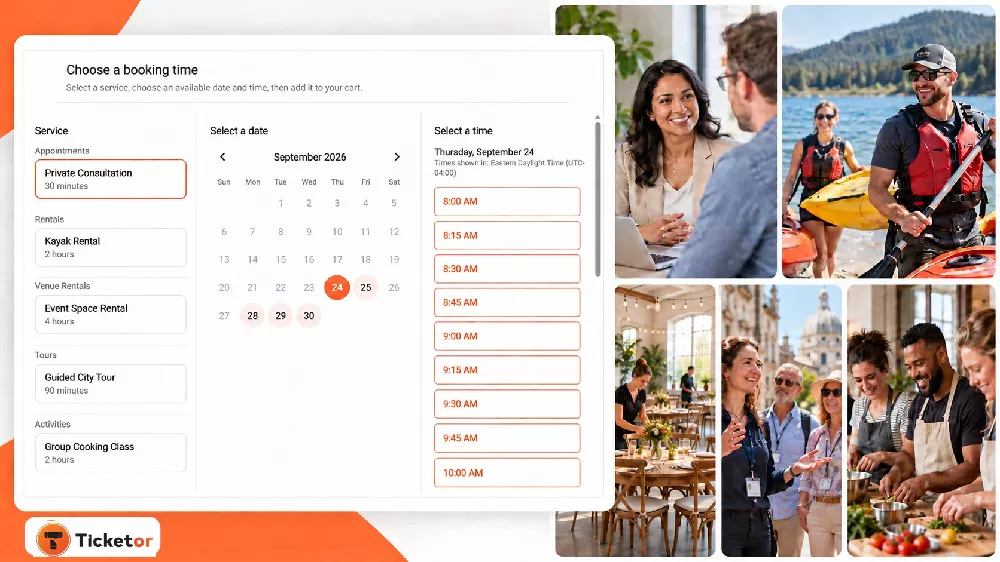
With Ticketor Bookings, customers can choose a service, select an available date and time, answer the questions you need, and complete the reservation online. The same booking system can support:
- One-on-one appointments and consultations
- Equipment, boat, vehicle, or venue rentals
- Guided tours and private experiences
- Classes, lessons, and group activities
- Online meetings and sessions
- Any service that requires a customer to choose an available time
You control the working schedule, booking window, service duration, capacity, preparation or cleanup buffers, skipped dates, and pricing. Different service groups can have different durations or capacities, while booking options can handle variations such as adult and child pricing, member rates, weekday and weekend prices, or equipment choices.
Availability can also account for linked calendars. That matters when a booking depends on a person, a room, a boat, or a piece of equipment that may already be committed elsewhere.
For organizations serving customers across regions, a booking can show times in the booker's timezone. Local rentals and in-person appointments can continue using the venue timezone. The goal is simple: show the time in the way that creates the least confusion for that service.
Choose what a customer must do to confirm
Not every booking should be paid the same way. A prepaid tour, a rental deposit, and a free consultation have different business requirements.
For each Ticketor booking service, you can choose to:
- Collect the full amount
- Collect a partial payment
- Place a full or partial authorization hold on the customer's card
- Verify the customer's email address
- Verify the customer's phone number
- Confirm the booking without upfront payment or verification
That flexibility lets the payment step match the risk and purpose of the service. An equipment rental may need a card hold. A class may require full payment. A consultation may only need verified contact information.
After booking, Ticketor can send confirmations and calendar invitations, apply your cancellation or rescheduling rules, and keep the booking visible in customer and staff workflows. Organizers can review scheduled bookings in reports and calendar-style views instead of maintaining another spreadsheet.
Bookings are connected to the rest of the business
The value of adding bookings to Ticketor is larger than the booking calendar itself. Scheduled services now sit beside the systems an organization already needs.
Events and box office
Sell general-admission or assigned-seat tickets, recurring events, season passes, memberships, packages, online events, and in-person box-office sales. Staff can use the same administrative environment instead of learning a second system for appointments or rentals.
Your branded website and CMS
Use Ticketor as your official website, run it on your own domain, add a ticketing and booking section to an existing site, or embed it into another CMS. Event pages, booking pages, store pages, donation campaigns, galleries, news, and other content can share the same design and navigation. Learn more about Ticketor's website builder and CMS.
Marketing and CRM
Ticket buyers and booking customers contribute to the same customer history instead of disappearing into separate contact lists. Use built-in email newsletters, SMS/MMS where available, automated messages, audience segments, coupons, affiliate tracking, trackable links, analytics, and advertising integrations to understand and reach your audience. Explore Ticketor's integrated marketing tools.
Merchandise, gift cards, food, parking, and add-ons
Sell merchandise and other products online or at the point of sale. Offer gift cards that customers can redeem across eligible purchases. Tickets, merchandise, parking, food and beverage, gift cards, and donations can share one commerce system and unified reporting rather than requiring a collection of storefronts. See the available ticketing add-ons and commerce tools.
Donations, donor management, and auctions
Create donation pages for different causes, invite donations during checkout, support one-time or recurring gifts, issue configured receipts, and report on donors. Nonprofits can also run silent auctions and online bidding alongside ticket sales and fundraising campaigns. Read more about donations and donor management.
Reviews and reputation
Request feedback from verified buyers and display reviews on your own site. Because reviews are connected to the customer and purchase relationship, they can become part of the same post-purchase workflow rather than another unconnected subscription. Learn about Ticketor reviews and reputation management.
What one connected platform looks like in practice
The benefit becomes clearer when the features are used together.
A performing arts organization can sell reserved seats, season passes, acting classes, private lessons, and venue rentals; promote them through newsletters; sell merchandise and gift cards; collect verified-buyer reviews; and report on the same audience from one account.
A nonprofit can sell gala tickets and tables, accept donations, run a silent auction, recognize sponsors, manage supporters, send targeted follow-ups, and maintain its fundraising website without building a temporary technology stack for each campaign.
A tour or activity operator can offer scheduled public tours, private experiences, equipment rentals, and gift cards while keeping availability, customer questions, payments, calendar commitments, marketing, and reports together.
A community organization or school can sell admission to performances and games, register students for classes, schedule facility rentals, run a store, collect donations, and communicate with families and supporters from the same platform.
No organization needs every feature on day one. The point is that the pieces are available when the need appears, and they are designed to work together.
Fewer handoffs, clearer operations
Connecting these workflows can reduce the practical friction that comes with a stack of unrelated services:
- Fewer systems, subscriptions, passwords, and staff training paths
- Less duplicate entry between a website, scheduler, ticketing platform, store, and CRM
- More consistent branding from discovery through checkout and confirmation
- Customer and transaction history that is easier to understand
- Fewer manual exports and spreadsheet reconciliations
- One place to apply staff roles, permissions, policies, and reporting
Integration does not remove the work of running an organization, but it removes many of the avoidable handoffs around that work.
Use the features you need and keep room to grow
Ticketor began as a ticketing and box-office platform, but the needs of organizers extend far beyond issuing a ticket. They need to publish content, schedule services, take payments, know their customers, sell products, raise funds, build trust, and understand what is working.
Online Bookings brings appointments, rentals, equipment, tours, activities, lessons, consultations, and venue rentals into that same environment. For organizations that manage both events and scheduled services, it means the customer does not have to leave your brand—and your staff does not have to leave the platform—to complete the next job.
Explore how appointment and rental bookings work in Ticketor.
