Digital Ticket Delivery: Email, Text, WhatsApp, Google Wallet and Apple Wallet
Selling the ticket is only half the job. The buyer still needs to receive it, find it when the event begins, share it with other people in the group, and present it at the gate. The best place to keep that ticket depends on the buyer: their inbox, text messages, WhatsApp conversation, Google Wallet or Apple Wallet.
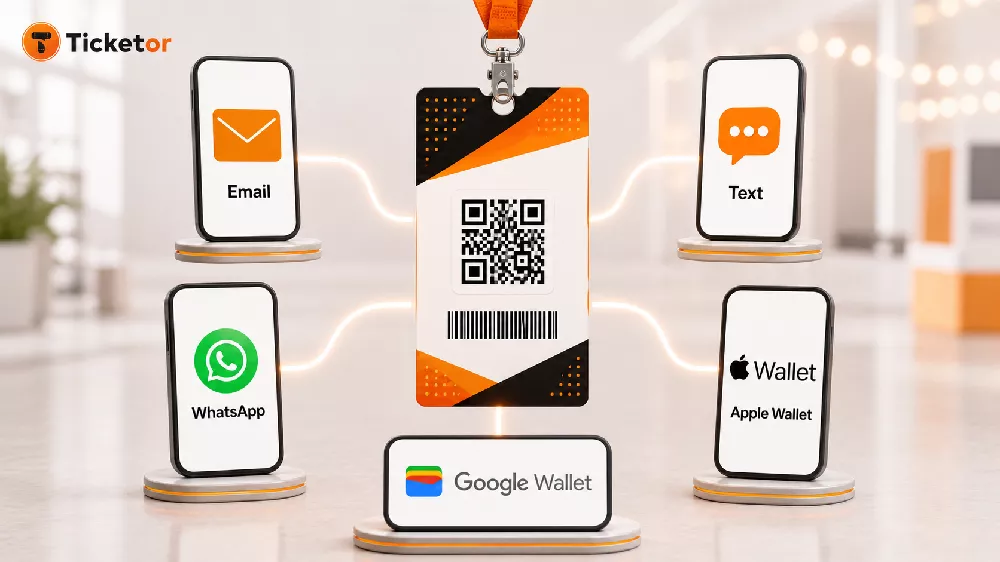
Ticketor brings all five digital paths together. Organizers can deliver branded tickets instantly without requiring buyers to install an event app. Each ticket carries a unique code in QR-code, barcode and readable-number formats, connecting convenient delivery to secure validation at the gate. Recent additions—including WhatsApp delivery and Google Wallet and Apple Wallet support—give buyers more ways to keep their tickets close while leaving the organizer in one connected system.
Five digital paths to the same secure ticket
There is no single digital destination that is right for every audience. Some people start with email. Others respond faster to a text or WhatsApp message. Frequent mobile-wallet users want the ticket beside their boarding passes, loyalty cards and other event credentials.
With Ticketor, the ticket stays consistent while the access point changes. The buyer receives the correct ticket data, QR code and barcode regardless of whether they open it from a message, save it to a wallet or print it. Learn how to configure Ticketor ticket delivery options.
Email and mobile e-tickets
E-tickets are the fastest and most automated choice. When the purchase is completed, the buyer can access the tickets from the confirmation page, receive access through the confirmation email, or return to their Ticketor account later. Each ticket can be shown on a phone or printed at home.
Ticketor tickets are individually accessible and shareable. That matters when one person buys for a family, a table, a team or a group of friends: the buyer can distribute the appropriate ticket instead of forwarding a single multi-ticket PDF and asking everyone to find the right page.
Each ticket includes a unique QR code, barcode and human-readable number for validation. At the event, staff can scan the ticket from the buyer's phone or from a printed copy using Ticketor's gate-control tools.
Text (SMS) ticket delivery
For buyers who rely on text messages, Ticketor can send each ticket separately by SMS in supported regions. The buyer can open the ticket from the conversation and forward an individual ticket to another attendee in the group.
SMS ticket delivery is currently intended for supported US and Canadian numbers, and messaging charges may apply. Organizers can configure the associated delivery method and fee rather than absorbing an unexpected communications cost.
WhatsApp ticket delivery
Ticketor's newer WhatsApp delivery option extends that convenient, one-ticket-per-message experience internationally. When a buyer selects it, Ticketor sends the tickets to the buyer's WhatsApp number and also sends them by email after the order is completed. Individual messages make it easy to forward different tickets to different members of a party.
WhatsApp delivery is available worldwide, while pricing and configuration still matter. Ticketor lets the organizer create or adjust the delivery method and decide what to charge. The Ticketor What's New page documents the rollout and current delivery notes.
Google Wallet and Apple Wallet
Buyers can also add supported tickets to Google Wallet or Apple Wallet. A wallet pass gives the attendee another quick way to find a ticket at the entrance without searching through an inbox or photo gallery.
Wallets do not replace the other options. They complement email, SMS and WhatsApp, so each buyer can use the method that best fits their phone and habits. Ticketor's smart e-ticket and custom ticket design overview explains how mobile tickets, wallets, sharing and scanning work together.
Together, these five choices keep digital delivery simple. Email provides a familiar record of the purchase. Text and WhatsApp put individual tickets inside everyday conversations. Google Wallet and Apple Wallet give mobile-first buyers a dedicated place to retrieve them. Ticketor remains the source of the ticket, buyer information and admission status behind every option.
Secure QR codes and easy ticket scanning
The delivery channel may change, but the ticket's identity does not. Ticketor issues each ticket with one unique, hard-to-generate code. The same code appears as a QR code, a barcode and readable digits, so gate staff have more than one way to validate admission. Forwarding, downloading or printing the ticket does not create another valid admission; every copy points back to the same ticket record.
At the entrance, staff can use the free Ticketor Gate app or Gate Control page with a smartphone, tablet or laptop. The device camera can scan the QR code directly from a buyer's phone or printed ticket. Organizers that need faster throughput can connect compatible Bluetooth or USB scanners, while several authorized gate controllers can scan simultaneously across multiple entrances.
Validation happens as part of the scan. A valid ticket is accepted and marked as used. Ticketor rejects invalid codes, refunded tickets, tickets for another event or performance, and duplicate copies that have already been admitted. Clear visual messages and distinct success or rejection sounds help staff keep their attention on the guest and the line instead of repeatedly touching the screen.
QR codes generally scan faster and more reliably than one-dimensional barcodes, but the gate team is not stranded when a phone screen is damaged or a code will not scan. Staff can search for the attendee by name, email address, phone number or confirmation number, or enter the readable ticket code manually. Exit mode supports controlled re-entry, and an offline workflow is available for venues with unreliable connectivity, subject to its documented setup steps and limitations.
Read the Ticketor Gate Control and e-ticket validation guide to plan devices, staff roles, online or offline operation and pre-event testing.
Other delivery methods when an event needs them
Digital delivery is the focus, but it is not the only workflow Ticketor supports. Organizers can offer will-call, mail, custom pickup and direct box-office delivery for buyers or events that need a physical handoff.
Will-call and pickup
Will-call remains valuable for patrons who prefer to collect tickets at the venue, buyers who need assistance, VIP packages, complimentary tickets, or events with a traditional box-office workflow.
Ticketor supports two practical approaches. Staff can find an invoice when the buyer arrives, print the tickets, and mark the order delivered. Or the organizer can bulk-print undelivered will-call tickets before the event, sorted for efficient pickup. A receipt or buyer header can accompany each order when a signed record is useful.
The Print Tickets report now focuses fulfillment on will-call or mail tickets that have not already been marked delivered. That helps staff avoid preparing the same order twice while still allowing invoice-by-invoice delivery as guests arrive.
Mail and postal delivery
Some events still benefit from physical tickets: premium experiences, galas, season packages, commemorative events, audiences that prefer paper, or orders that include a keepsake-quality ticket.
Organizers can offer one or more mail services, collect the shipping address, and set an appropriate delivery charge. Ticketor can print mail orders one invoice at a time or in batches. The workflow includes buyer shipping information and lets staff focus on orders that have not yet been shipped. A “tickets sold after” filter also supports recurring fulfillment runs instead of reprinting the entire sales history.
Because postal delivery requires lead time, organizers can stop offering it near the event while leaving instant digital or will-call options available.
Direct delivery at the box office or retail location
For face-to-face sales, an administrator or sales agent can use direct delivery, print the ticket immediately, and hand it to the buyer. This works for a venue box office, school office, visitor center, retail partner or mobile sales location. If the buyer's email is collected, the organizer can also choose whether the confirmation email includes e-tickets.
Ticketor supports regular printers and professional thermal ticket printers. Physical tickets use the same barcode and QR-code validation system as e-tickets, so the gate team does not need a separate admission process. See the guide to printing physical tickets with Ticketor.
Design beautiful tickets and badges without exporting attendee data
Flexible delivery should not reduce every ticket to a generic receipt. Ticketor's Ticket / Badge Designer lets the organizer create reusable layouts for e-tickets, printed tickets, badges, labels and passes inside the same system that holds the event and ticket information.
Start with a system design or build a layout for your own event. Add and arrange:
- Your logo, event artwork, background and brand colors
- Event, venue, date and admission information
- Attendee, buyer or ticket details
- Section, row, seat, table, price level or access type
- Answers collected through Ticketor's question manager
- Sponsor logos, advertisements, terms or custom instructions
- QR codes and barcodes for admission
- Text, pictures, lines and boxes for a polished layout
Objects can be moved, resized, rotated, duplicated and layered. Dynamic tags insert the correct event, buyer and ticket values when each ticket is generated, and the design can be previewed with an event before it goes live. The result can be a sleek mobile ticket, a professional conference badge, a gala pass, a color-coded VIP credential, a sponsor-supported festival ticket or a compact thermal ticket—all connected to the same order and scanning workflow.
The Ticketor Ticket / Badge Designer guide shows how to create reusable designs and begin from an existing system template.
Match the delivery mix to the event
A good delivery setup usually offers choice without turning checkout into a catalog of nearly identical options.
- A festival may default to mobile e-tickets while also offering SMS, WhatsApp and wallet access.
- A theater may combine email tickets with will-call for patrons who need help at the venue.
- A conference may use branded badges, wallet passes and on-site printing.
- A gala may offer digital tickets for most guests and mailed keepsake tickets for sponsors or premium tables.
- A school or community organization may combine email delivery with office pickup and box-office printing.
- A tour, attraction or sports venue may use mobile tickets for advance sales and direct delivery for walk-up buyers.
Ticketor lets each event have its own set of delivery methods. You can auto-select the most practical default while leaving other approved options available, charge for methods that have a real fulfillment or messaging cost, and update an invoice's delivery method when a buyer's circumstances change.
One connected workflow from design to admission
The advantage is not simply a longer list of delivery choices. It is having ticket design, checkout, delivery, fulfillment, buyer records, secure QR-code validation and physical printing connected in one account.
The organizer designs the ticket once. Ticketor fills it with the correct order and attendee information, adds the ticket's unique scannable code, delivers or prints it through the selected workflow, tracks its status, and validates it at the gate. Buyers get a convenient experience, while staff have fewer disconnected tools and manual lists to reconcile.
Ready to offer professional, branded tickets without limiting how buyers receive them? Create a Ticketor account and configure the delivery options that fit your next event.
