Ticketor Introduces Automated, Personalized Ticket Buyer Chat
The new add-on helps buyers find tickets and receipts, get event answers, and make their next purchase while giving event teams fewer routine questions to answer.
FOR IMMEDIATE RELEASE
LOS ANGELES, November 5, 2026 — Ticketor, a white-label event ticketing and box-office platform, announced automated, personalized ticket buyer chat for event organizers, venues, and nonprofits. The chat gives buyers a place to get help on the organizer’s own ticketing site, whether they’re looking for the tickets they already bought or deciding what to attend next.
“Where are my tickets?” and “How do I use my season pass?” often land in the same inbox as questions that need a staff member’s judgment. Buyer Chat handles common requests through guided choices, with answers based on the organizer’s published information and, when appropriate, the buyer’s own account. The aim is to make it easier to buy again and give staff more time for the people who need them.
A welcome that reflects the buyer’s relationship with the venue
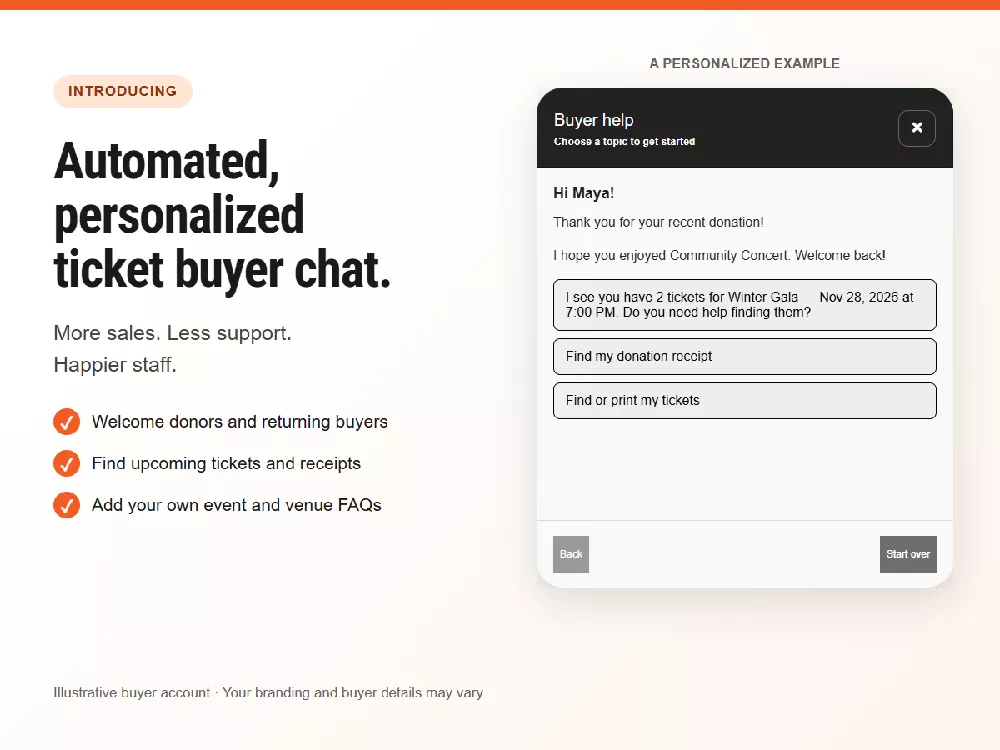
After a buyer signs in, the chat can securely access that buyer’s own Ticketor account and purchase records. It uses details such as upcoming tickets, recent donations, past visits, and membership or season-pass status to offer relevant help. A returning donor with two tickets to an upcoming gala, for example, could be thanked for giving, welcomed back after a recent visit, and offered buttons to find the gala tickets or open a donation receipt.
The chat can help buyers sign in, find or print e-tickets, open order confirmations, understand common payment questions, and update account details or reset a password. It can also point buyers to upcoming events and show them how to buy or use a season pass or membership where the organizer offers one. Public event and venue details are available without signing in; private order information requires authorized account access.
Organizers decide what the chat answers and when to step in
Organizers can publish their own answers to questions about things like bag policies, dress codes, or accessible entrances. An answer can apply across the site or only to relevant events or groups. If the chat hasn’t answered a buyer’s question, organizers can let the buyer send an email from the chat. The designated staff receive the buyer’s request and the conversation history so they can reply by email with context.
How to try Buyer Chat
Buyer Chat Support is an optional Ticketor add-on. Eligible administrators can open Buyer Chat Support under Account & Settings in the Control Panel to review their trial end date and monthly price. Once enabled, they can use Try Buyer Chat to preview the experience from a selected buyer’s perspective. Organizers evaluating Ticketor can schedule a Ticketor demo.
About Ticketor
Ticketor provides white-label online ticketing and box-office software for event organizers and venues. Organizers can sell through their own branded sites, manage admissions and in-person sales, and offer donations, memberships, and season passes.
